
In development · the Tutor: early maths and reading, ages 4–8
A robot that teaches with you, not instead of you.
HeyAndy’s Tutor is a family learning device: a small robot and your family’s tablet that will practise counting, letters and sounds with your child. It is designed to be used with a parent nearby, and to keep only what you choose.
HeyAndy is in development. Nothing is for sale, and planned features may change or may not be built.

Robot design concept. The robot body is not final.
One HeyAndy
A robot, a tablet and your phone. You stay in charge.
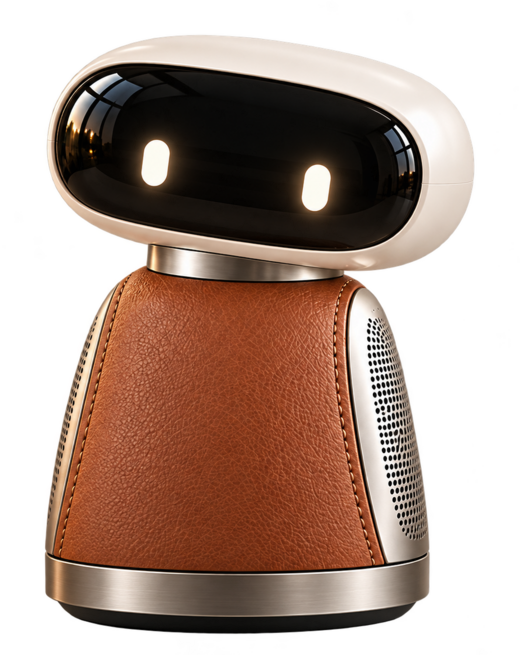
The robot
Designed to ask the question out loud, listen, and give a hint when it helps. Its part of the lesson is still being built.
The tablet
Big answers to tap or write. No clock, no streaks, no ads.
Your phone
Your child’s requests come to you. A weekly summary of what they practised is designed to follow.
A lesson
Ten calm minutes, one question at a time.
A sample counting lesson for a six-year-old, as it is designed to run. The words and numbers are examples, and the robot’s part is still being built.
HeyAndy is designed to start out loud
The robot is designed to greet your child, say that it is an AI, and say what they will do today, so nobody has to read.
Your child answers on the tablet
One question per screen, with big answers. “Say it again” is always in the same place.
A hint, never the answer first
If an answer is not right yet, Help gives a smaller step, one at a time, and never the answer first.
It ends on time
The lesson ends when the day’s time is used. No “one more”, no pressure to come back. The robot is designed to say goodbye.
A summary for you
A weekly summary is designed to tell you what they practised, with one idea to try together.
Try it
Count with HeyAndy.
Three short rounds, the way the tablet asks. No score, and nothing is saved.
What comes after 4?
Yes. That’s it.
For grown-ups
When your child asks for something new, it comes to you.
You approve with your passkey. Your child is told that they asked a grown-up, and carries on.
Time you set
When the time is up, HeyAndy rests.
Each age has a daily limit by default, and only a parent can change it. The tablet counts the minutes, even offline, and the lesson ends kindly when they are used.
Today20 of 20 minutes
Example: a limit a parent might set for a six-year-old.
What we promise
Built for a family, not for attention.
Passkeys, not passwords
Every grown-up has their own sign-in. There is no password to steal.
Only what you choose is kept
Nothing said in a lesson is recorded. You can download or delete your family’s data.
No streaks, ads or clocks
Children learn without loss-aversion tricks, rewards that pile up, or a timer on screen.
What HeyAndy never does
- Reads your child’s mood from their face or voice
- Shows ads or sells data
- Pushes your child to come back
Made to last
The robot body can change. Your household’s HeyAndy stays.
Your child’s progress and your settings belong to your household, not to one machine. A new body is designed to pick up where the last one left off.
Questions
Questions parents ask
Does my child need to read?
No. Every control on the tablet has a picture as well as a word, and every instruction is designed to be spoken: by the robot, or by the tablet until the robot can.
Is anything my child says recorded?
No. Speech is used to answer in the moment and is not kept. You choose what HeyAndy remembers.
Which tablet do we need?
An iPad you already have. A TV is designed to show the lesson too, for the whole room to see; we have not yet run a lesson on a real TV.
How do grown-ups sign in?
Passkeys, not passwords. If you lose your phone, recovery has a 72-hour safety wait.
Can other adults help?
Invite up to 6 adults. A Helper sees only what you share.
What happens when my child asks for something new?
The request goes to a parent: the request comes to your phone, and you decide.
Can we see or delete our data?
Yes. We answer privacy requests within 45 days, and deletion is checked store by store.
What if we stop?
Closing a household gives you 30 days to change your mind. Each adult’s own account stays theirs.
When can we get one?
HeyAndy is in development and we are not taking orders. This page will say when the first families can join.
For parents
Parents, ask about the Tutor.
In development
Review a starting question, then edit and send it in your email app.
HeyAndy is in development. Nothing is for sale, and planned features may change or may not be built.